“Planned material usage by agrifield” shows which materials, and how much of them, are planned for the fields in the selected period. Use the page before the season or the start of a month to work out how much fertilizer, seed and plant protection products you need. It is based on the fieldwork tasks planned in the calendar that have materials added to them.
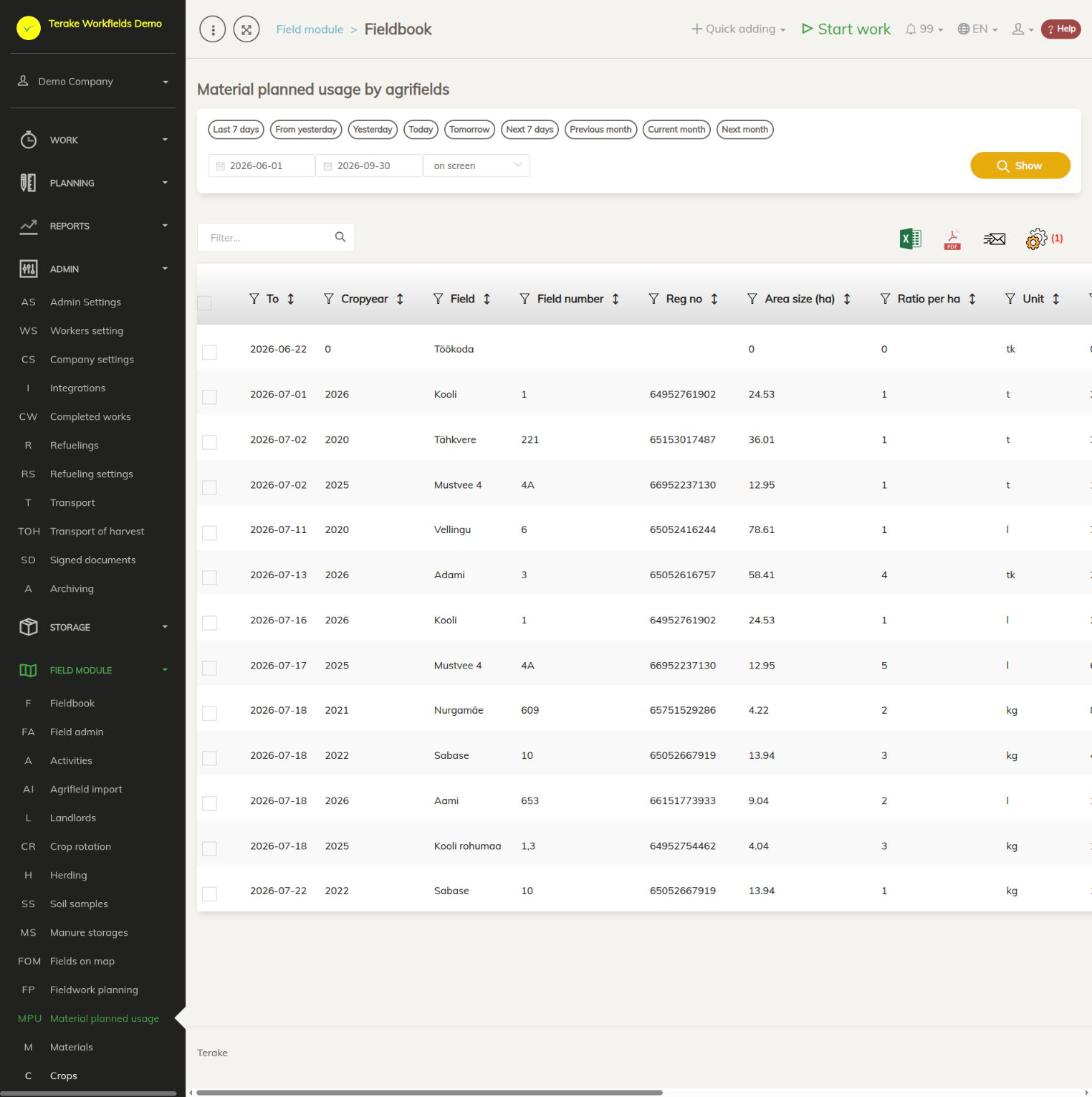
Page layout
- At the top is the period selection: start and end date and quick choices (for example “Current month”, “Next month”). Press “Show”.
- The table has one row for each task and material. The columns are “ID”, “From”, “To”, “Crop year”, “Field”, “Field number”, “Reg no”, “Area size (ha)”, “Ratio per ha”, “Unit”, “Total for field”, “Material”, “Crop”, “Variety”, “Worktype” and “Additional”.
- Above the table are a search field (“Filter…”), download as an Excel or PDF file, and a cogwheel for hiding and showing columns.
How to view the materials planned for a period
- Select the period and press “Show”. The table lists tasks linked to fields whose planned start and end both fall within the selected period.
- If needed, narrow the list with the search field (for example by material or field name), or sort it by clicking a column heading.
- Download the table as an Excel or PDF file to add up the quantities or pass them on.
How the values are calculated
- “Crop year”, “Area size (ha)”, “Crop” and “Variety” are taken from the field’s crop year data. If the task was created from a fieldwork plan, the plan’s crop year is used; otherwise the crop year in effect at the task’s planned start. If the field has no such crop year, the crop year and area are 0.
- “Total for field” = “Ratio per ha” × “Area size (ha)”, rounded to two decimal places. The unit is the material’s unit.
- “Worktype” and “Additional” come from the fieldwork plan if the task was created from a plan; otherwise the worktype is the task’s own.
How to add materials to tasks
- In the fieldwork plan, add the materials with their application rate on the “Material consumption” tab (see Fieldwork plan admin). They are added to the plan’s tasks that are not yet done.
- You move the plan’s fields to the calendar as tasks on the Fieldwork planning page with the “Add fields to calendar” button.
- You can change the materials of a single task in the task form in the calendar (see Tasks).
Who can see and change it
The page is visible to “Administrator”, “Observer” and “Agronomist”. The page is view-only; the data is changed in the fieldwork plan and in the tasks.
Tips
- A task that starts before the period or ends after it does not appear in the table. Choose a period that is wide enough.
- The “To” column currently shows the same date as “From” (the task’s planned start).
- The materials actually used, field by field, are on the Activities page.
API calls on this page
For integrations and AI assistants: this page uses the following Terake API calls. The full description is in the API reference.
When the page opens:
GET /api/report/agrifieldplannedmaterialusagereport– Planned material usage per agrifield over a period.