On the “Refueling settings” page (table heading “Fuel balance and consumption”) you see each machine’s fuel balance and calculated fuel consumption for the selected period, and you enter the fuel balance measured in the tank. From the measured balances and the refuelings, Terake calculates the machine’s fuel consumption and divides it between the machine’s works. The page is used by the administrator and the accountant.
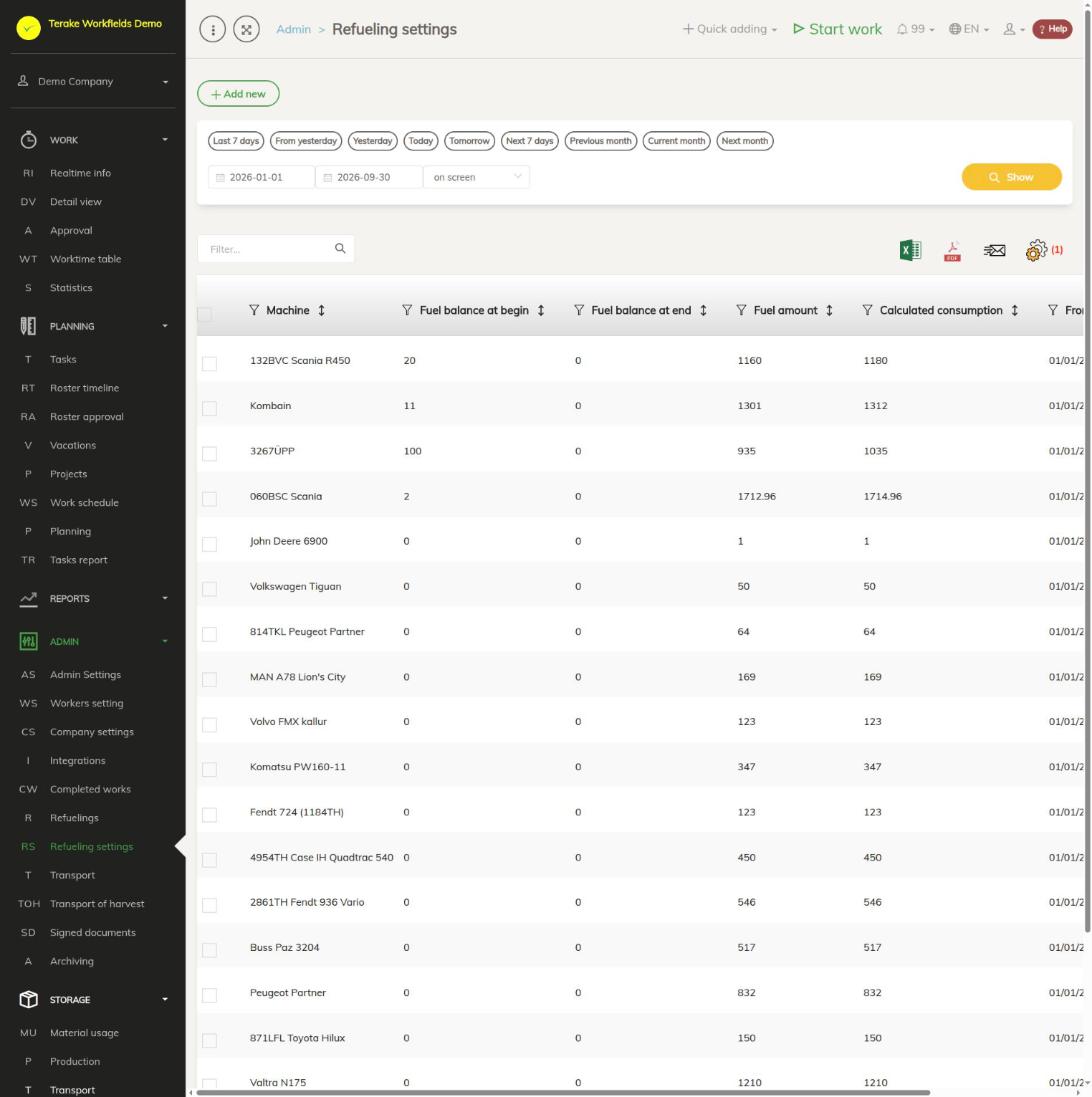
Page layout
- The “Add new” button opens the form for entering a measured fuel balance.
- Period selection: quick buttons (for example “Previous month”, “Current month”) or a start and end date, then “Show”.
- The table has one row for each machine that has a balance or a refueling in the period. Columns:
- “Machine”.
- “Fuel balance at start”: the last measured balance on or before the first day of the period.
- “Fuel balance at end”: the first measured balance on or after the last day of the period.
- “Fuel amount”: the refuelings of the period in total (not counting AdBlue).
- “Calculated consumption”: the balance at the start minus the balance at the end plus the amount refueled.
- “From time” and “To time”: the start and end of the period.
- Above the table are a search field and buttons for downloading the table as an Excel or PDF file and for choosing columns.
Balances and consumption are shown in the table in whole litres, the amount refueled with decimals.
How to enter a measured fuel balance
- Measure the amount of fuel in the machine’s tank.
- Press “Add new”.
- Select the “Machine”. The selection contains the main machines.
- Select the “Date” on which the balance was measured.
- Enter the “Fuel balance” in litres.
- Press “Save and close”.
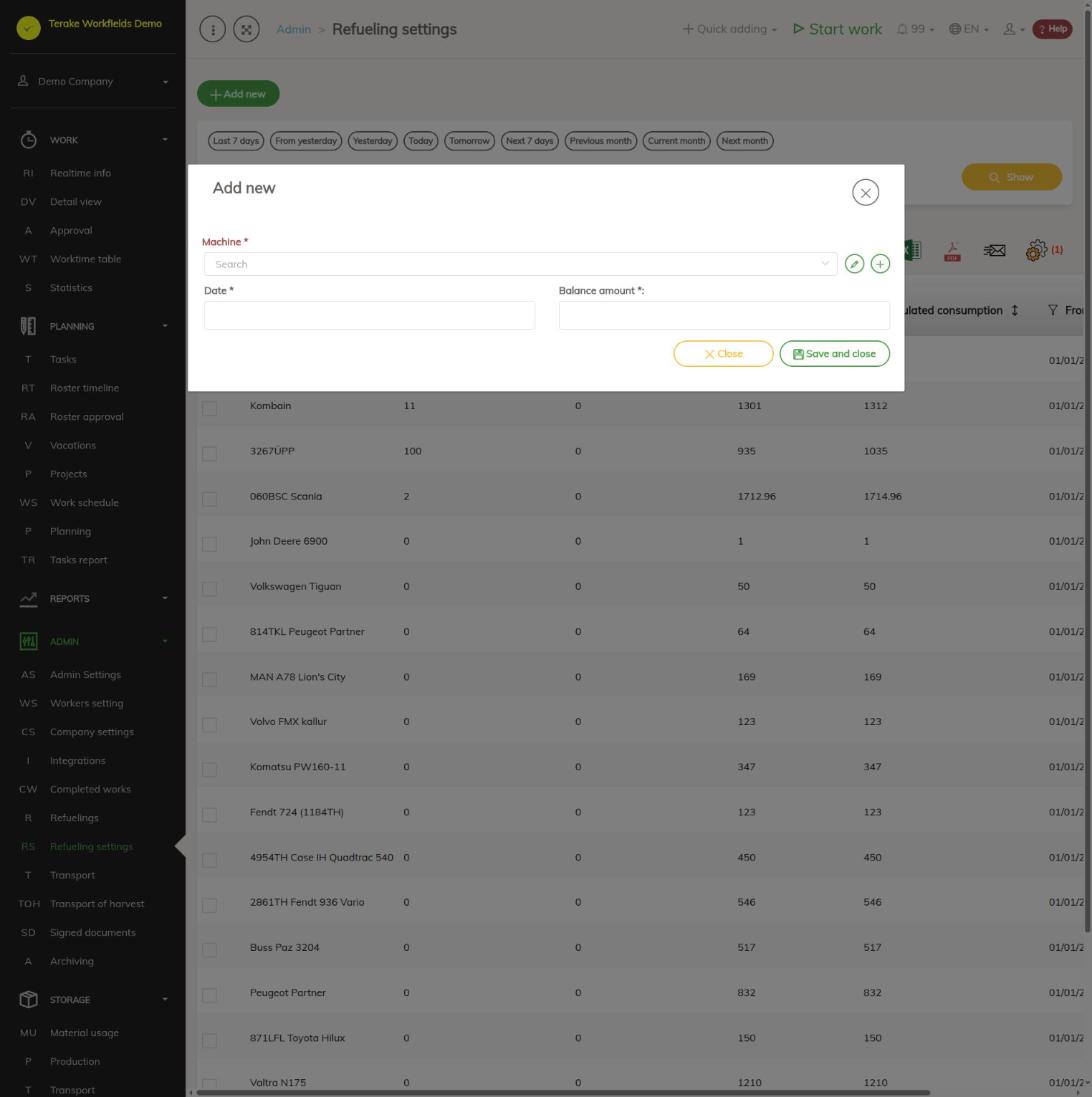
All three fields are mandatory. Right after saving, the fuel consumption is calculated from the previous measurement up to this date, and also the consumption of the next period if a later measurement already exists.
How to change the balance at the end of a period
- Select the period and click the machine’s row. The “Update fuel balance and consumption” window opens.
- Enter the correct “Fuel balance”. It is saved as the balance of the last day of the period.
- Press “Save and close”.
How fuel consumption is calculated
- Consumption is calculated between two consecutive measured balances: the previous balance minus the new balance plus the amount refueled in between (not counting AdBlue). Terake also recalculates the consumption by itself a couple of times a day when work or refuelings in between have changed (see Automated processes).
- A measured balance can also come from a refueling: if “Fuel balance in tank (before filling)” was entered for a refueling, the first such refueling of the day gives the balance for that day. This way balances are also created when refuelings are loaded from a file and from integrations.
- The consumption is divided between the confirmed works of the period by engine hours, kilometres and duration. Work types marked “Excluded from fuel consumption” get no consumption.
- If the machine has no earlier balance within three months, the start is taken from the first refueling in those three months.
- Twice a day Terake reviews the last three months: it adds the balances missing from refuelings and recalculates the consumption if works of the period have been confirmed or refuelings changed in the meantime.
Who can see and change it
The page is seen by the “Administrator” and the “Accountant”. A user with the “Administrator” role always has the “Add new” button. The “Accountant” sees it only if “Users have by default create privilege” is ticked on the Company settings page.
Tips
- For a more accurate consumption, measure the balance regularly, for example at the end of each month, or enter the balance with every refueling.
- You enter and load refuelings on the Refuelings page and set up filling station integrations on the Integrations page.
- To leave a work type out of the fuel consumption calculation, open it on the Worktypes page.
- The refueling report is on the Refueling page.
API calls on this page
For integrations and AI assistants: this page uses the following Terake API calls. The full description is in the API reference.
When the page opens:
GET /api/fuelbalances/main– FuelBalance periods
Other calls from this screen’s dialogs and actions:
GET /api/fuelbalances/{query_id}– FuelBalance periodGET /api/fuelbalances/main/{facility_id}– FuelBalance periodsPOST /api/fuelbalances– Save FuelBalancePUT /api/fuelbalances/{query_id}– Save FuelBalance