The maintenance module page “Materials” is the same list of materials as in the “Admin” menu. For maintenance, wear parts matter: spare parts and materials with a set lifespan or service interval, for example engine oil, filters or brake discs. Register them as materials whose “Material type” is “Spare part”, and describe their lifespan so that Terake warns you when the part is due to be replaced.
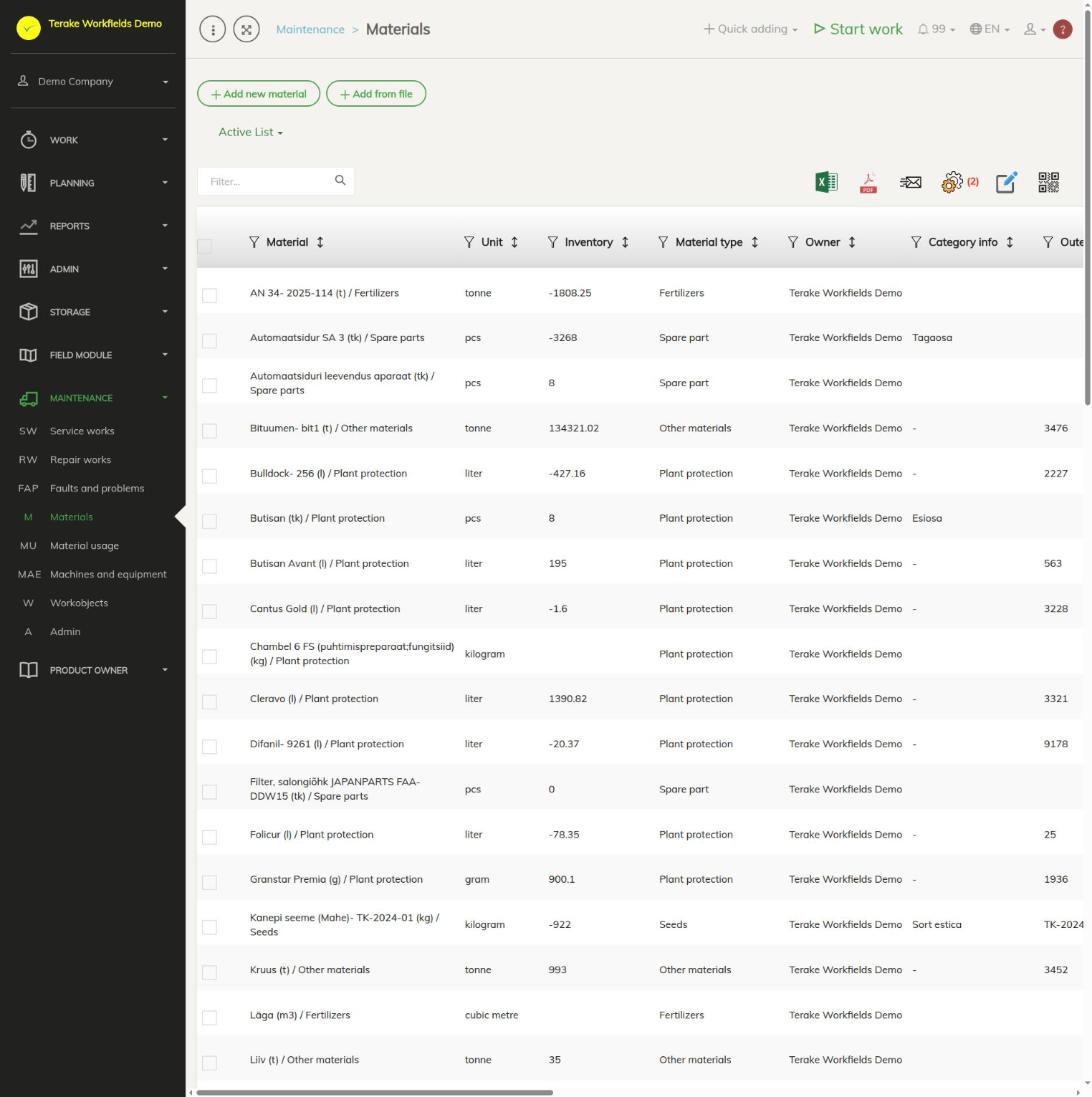
Page layout
- Buttons “Add new material” and “Add from file” and the drop-down “Active list” / “Archived list”.
- The table holds all of the company’s materials. To find the wear parts, filter the “Material type” column by “Spare part” or search by name in the field “Filter…”.
- The material window opens when you click a row. A spare part’s window also has the block “Spare part lifespan”.
How to add a spare part
- Press “Add new material”.
- Select “Spare part” as the “Material type”, enter the name and select the unit.
- Enter the “Cost per unit” if you want to see the material cost of maintenance in money.
- Press “Save”. The block “Spare part lifespan” becomes usable after the first save.
How to describe a spare part’s lifespan
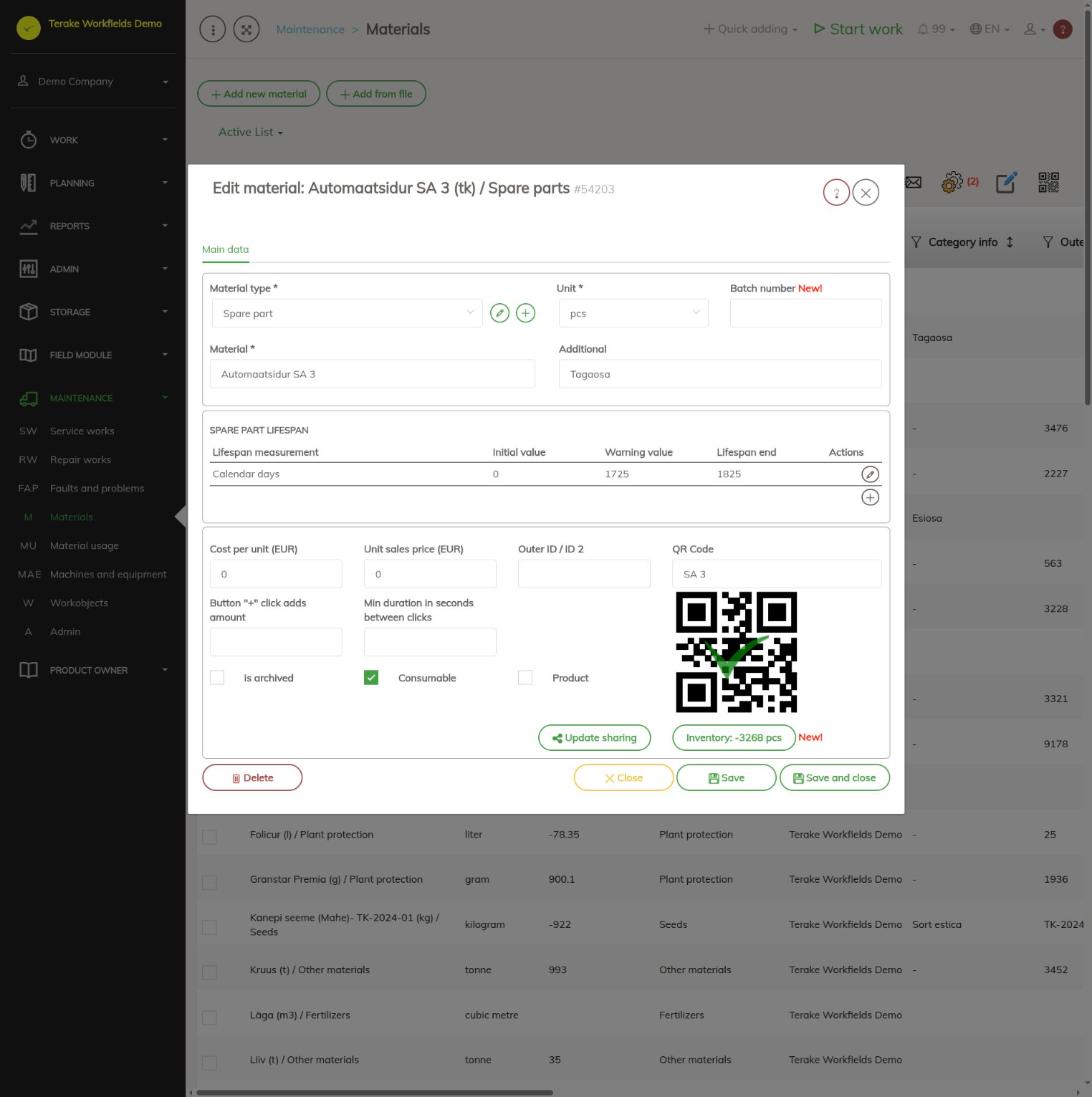
- Open the spare part and press the plus button (“Add to selection”) in the block “Spare part lifespan”.
- Select the “Lifespan measurement”: “Kilometers” or “Engine hours” (counted from the machine’s readings entered when work is finished and when refuelling), “Calendar days” (counted automatically) or a measurable value described by the company, for example brake disc thickness in millimetres.
- Enter the “Initial value”, “Warning value” and “Lifespan end”, for example for brake disc thickness 12.0, warning 10.5 and lifespan end 10.0 mm, or for engine oil 0, 1725 and 1825 calendar days.
- Press “Save and close”. Add the other measurements the same way.
Change or delete a measurement with the pencil on the table row (“Edit”). You can add a new measurement of your own with the button next to the measurement choice (see Lifespan measurement). A material that is always replaced together with another spare part (for example an oil filter together with the oil) does not need a lifespan of its own.
How to link a spare part to a machine
- Open the machine on the page Machines and equipment, select the “Parts” tab and press “Add”.
- Enter the part’s “Name”, select this material in the field “Spare part” and enter the “Amount”. Select the “Replace Task” and, if needed, the “Check or measure task”.
- Check that the machine’s maintenance schedule has the task of replacing the spare part (for example “engine oil change”) and, if needed, a check task (see Maintenance ADMIN).
When the replace task is marked done during a maintenance, the part’s lifespan starts again. At the check task, the part’s measured value is entered.
Who can see and change it
- In the “Maintenance” menu the page is shown to the roles “Vehicle service” and “Administrator”.
- The roles “Administrator”, “Agronomist”, “Vehicle service” and “Stock management” can add and change materials.
Tips
- The usage of spare parts added to maintenance and repairs is in the report Material usage.
- The other fields of a material, loading from a file and archiving are described on the page Materials.
API calls on this page
For integrations and AI assistants: this page uses the following Terake API calls. The full description is in the API reference.
When the page opens:
GET /api/materials– Material collection
Adding, changing and deleting (from the API description):
DELETE /api/materials/{id}– Delete MaterialPOST /api/materials/{material_id}/inventory– Save MaterialInventoryPOST /api/materials– Create or modify MaterialPOST /api/materials/{parent_id}/lifespan– Assign Lifespan to MaterialPUT /api/materials/{id}– Modify Material
Other calls from this screen’s dialogs and actions (from the web client’s code):
DELETE /api/workdones/{wdid}/materialusages/{usageid}– Deletes a material usage of a WorkdoneGET /api/materials/{id}– Get MaterialGET /api/materials/{id}/harvest_sources– Harvest Material sourcesGET /api/materials/{id}/material_composition– Harvest Material compositionGET /api/materials/{material_id}/inventory– MaterialInventory of a materialGET /api/workdones/{wdid}/materialusages– Workdone collection