“Engine hours rep.” (the engine hours report) shows the engine hours and odometer reading of each main machine at the start and end of the selected period. Use the report to check whether the readings entered by workers match the telemetry data, and to find the readings at the start and end of a period, for example for accounting or maintenance.
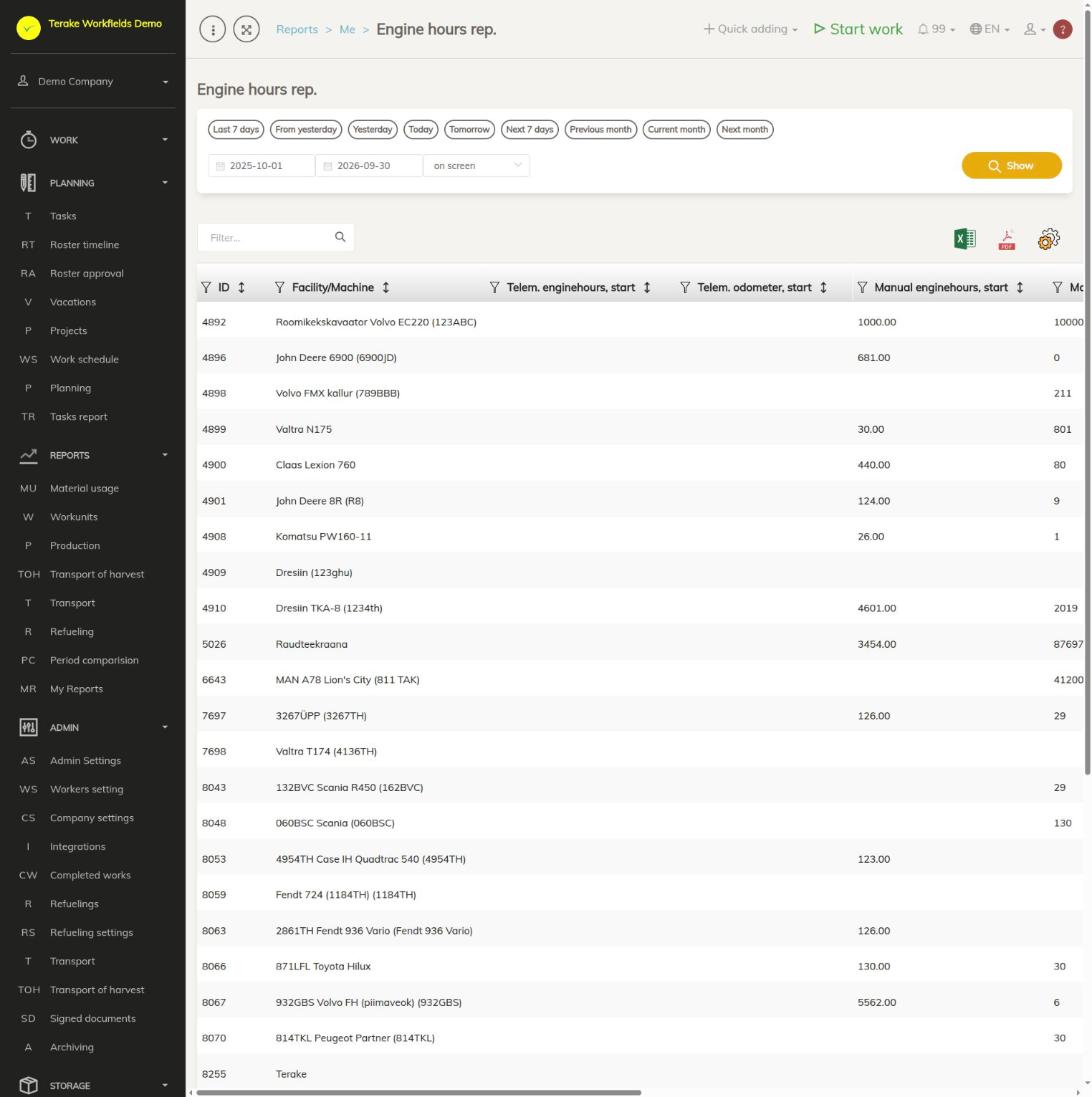
Page layout
- Period: the quick choices “Last 7 days”, “From yesterday”, “Yesterday”, “Today”, “Tomorrow”, “Next 7 days”, “Previous month”, “Current month” and “Next month”, or a start and end date, the output “on screen” or “MS Excel file”, and the “Show” button.
- Table: one row for each main machine with the columns “ID” and “Facility/Machine” and eight reading columns:
- “Telem. engine hours, start” and “Telem. odometer, start”, “Telem. engine hours, end” and “Telem. odometer, end”: readings received from the telemetry service provider.
- “Manual engine hours, start” and “Manual odometer, start”, “Manual engine hours, end” and “Manual odometer, end”: the start reading of engine hours and kilometres entered with a work.
- Above the table: the “Filter…” search field, the icons “open in Excel” and “open as PDF file”, and “set view”, where you choose and order the columns shown.
How to build the report
- In the “Reports” menu, open the My reports page and choose “Engine hours rep.” there.
- Choose the period with a quick choice or enter the dates.
- Choose “on screen” or “MS Excel file” as the output and press “Show”.
- Find a machine with the “Filter…” search field, or sort a column by clicking its title.
How the readings are found
- The reading at the start of the period is the last known reading before the period starts, the reading at the end is the last reading before the period ends.
- The entered reading is the start reading of the last work in which the machine was the main machine.
- Readings up to three months old are taken into account. If the machine has had no reading within three months, the cell stays empty.
- A reading whose engine hours and kilometres are both 10 or less is not counted.
Who can see it
The report is visible to the roles “Administrator”, “Observer”, “Agronomist”, “Dispatcher” and “Accountant”.
Tips
- Archived machines and implements are not in the report.
- If the telemetry and the entered reading differ a lot, check the readings of the works on the Detail view page.
- A comparison of machines’ engine hours by month is in the Period comparison report.
API calls on this page
For integrations and AI assistants: this page uses the following Terake API calls. The full description is in the API reference.
When the page opens:
GET /api/report/enginehours– Engine hours and kilometers per facility over a period.