The “Transport of harvest” page lists the transports of harvested crop (silage, grain and so on) from the fields in the selected period. Each transport takes the harvest from a field to a silo, a warehouse or another destination, and the transports build up the silage or harvest stock in the storage. Transports are usually registered in the mobile app; on this page you can check, correct, add and delete them.
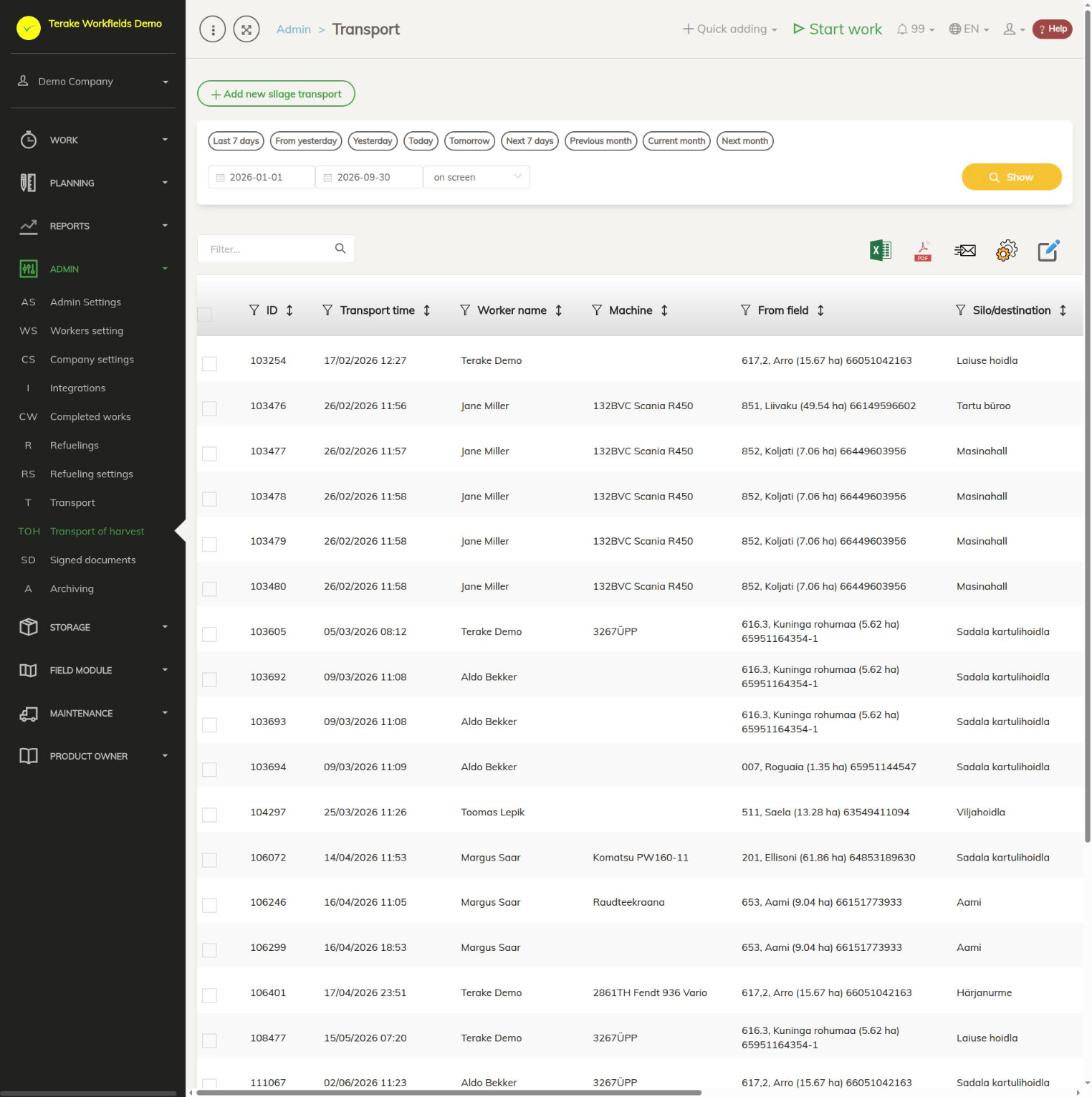
Page layout
- The “Add new harvest transport” button.
- Period selection: quick buttons or a start and end date, then “Show”.
- Table columns: “ID”, “Transport time”, “Worker name”, “Machine”, “From field”, “Silo/destination”, “Material”, “Amount (empty)”, “Amount (full)”, “Weight” and “Cargo count”.
- The trash can icon on a row deletes the transport. Ticked rows can be deleted at once with the “Bulk edit parameters” icon.
- Above the table are a search field and buttons for downloading the table as an Excel or PDF file and for choosing columns.
How to add a harvest transport
- Press “Add new harvest transport”. The form opens as a harvest transport; you do not have to choose a material.
- Enter the “Transport time”.
- Select the worker who made the transport. If you wish, select the “Worktype”, “Machine” and “Implement”.
- In “From field”, select the field the harvest was taken from, and in “Silo/destination” the place it was taken to.
- Enter the amounts: either “Amount (empty)”, “Amount (full)” and “Cargo count”, or “Amount total” directly.
- Press “Save and close”.
“Transport time”, the worker, “From field” and “Silo/destination” are mandatory. Together with the transport, a confirmed work with zero duration is created for the selected worker. If “Cargo count” is left empty, it is taken as one load.
How the material and amount are set
- If the purpose of the field’s crop at the time of the transport is grain or greenhouse, the material of the transport is the harvest of that crop, named “Saak <kultuur> <aasta>” (harvest <crop> <year>).
- Otherwise the material is the destination’s silage for that year, named “Silo <sihtkoht> <aasta>” (silage <destination> <year>), and the destination is marked as a storage.
- A missing harvest or silage material is created when the first transport is saved.
- Amounts are in tonnes. If a load’s amount or weight is over 1000, it is taken to be in kilograms and divided by 1000.
- “Cargo avg. amount” is the difference between the full and empty weight, and “Amount total” is the average load amount times the number of loads. If you enter “Amount total” directly, it is not calculated from the weights.
How to change or delete a harvest transport
- Click the transport’s row. The “Edit silage transport” window opens.
- Correct the fields you need and press “Save and close”. When you change it, the old amount is taken out of the stock and the new one is added.
- To delete the transport, press “Delete”. The linked work remains; the amount is taken out of the stock.
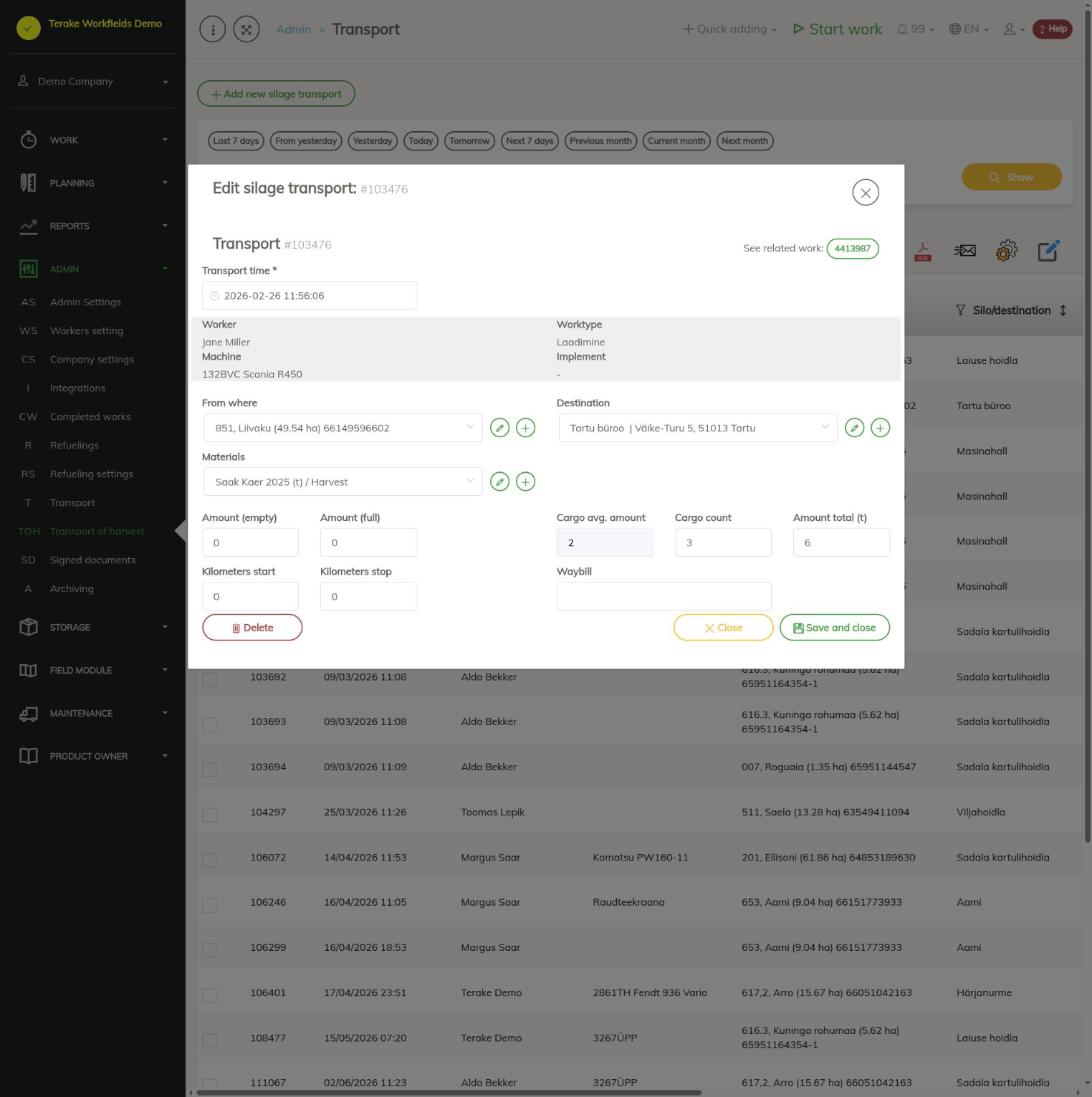
The worker, work type, machine and implement of an existing transport cannot be changed; they are shown on a grey background. To open the linked work, press the work number next to “See related work”. If the material of the transport is a harvest, the form has the fields “Starting point”, “Destination” and the material, as in an ordinary transport.
Who can see and change it
The menu item is visible in agricultural companies to users with the “Administrator” and “Accountant” roles. A user with the “Administrator” role always has the “Add new harvest transport” button; the “Accountant” sees it only if “Users have by default create privilege” is ticked on the Company settings page.
Tips
- A summary of the transports by field and storage is in the Transport of harvest report.
- Other material transports are on the Transport page.
- Set the field’s crop and its purpose on the Field admin page.
API calls on this page
For integrations and AI assistants: this page uses the following Terake API calls. The full description is in the API reference.
When the page opens:
GET /api/silagetransports– TransportCase collection