“Herding” is the register of grazing on the fields. Here you enter when and on which field animals grazed, and which animals and how many. From the grazing, the N and P amounts of manure left on the field are calculated and shown in the field’s fieldbook, and the grazing can be sent to e-PRIA, the online service of PRIA (the Estonian Agricultural Registers and Information Board).
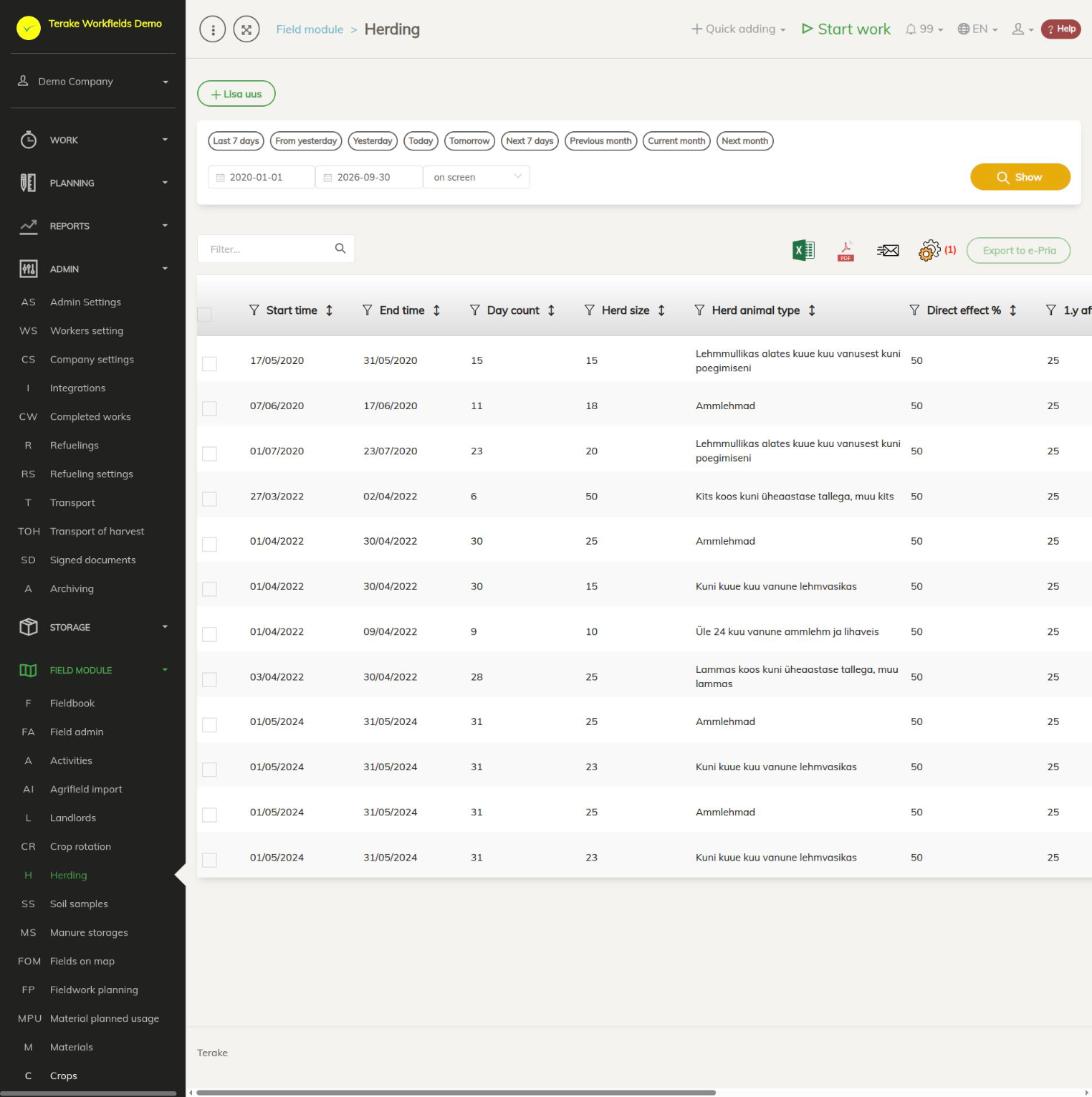
Page layout
- “Add new” opens the form for a new grazing record.
- Period selection: quick buttons (“Last 7 days”, “Current month” and others) or a start and end date, then “Show”. The list holds grazing records that fall at least partly within the selected period.
- Table columns: “ID”, “Start time”, “End time”, “Day count”, “Herd size”, “Field”, “Reg no”, “Grazing animals”, “Direct effect %”, “1.y aftereffect %”, “Pria sync time” and “Result”. You can hide columns with the cogwheel and download the table as an Excel or PDF file.
- “Export to e-Pria” sends the ticked grazing records to e-PRIA (the button is active when at least one row is ticked).
How to add a grazing record
- Press “Add new”.
- Select “Start time” and “End time” (required). “Day count” is calculated from them.
- Select “Field” and press “Add” next to it. The field appears in the table below. If animals grazed on several fields at the same time, add all the fields; the bin button in the table removes a field.
- Select “Animal type”, enter “Herd size” and press “Add”. If the herd had animals of different types, add each type separately.
- If needed, write “Additional”.
- Press “Save and close”.
A separate grazing row is created in the list for each pair of field and animal type. If you added several fields, the grazing intensity is divided equally between the fields (for example 50% each for two fields).
How to change a grazing record
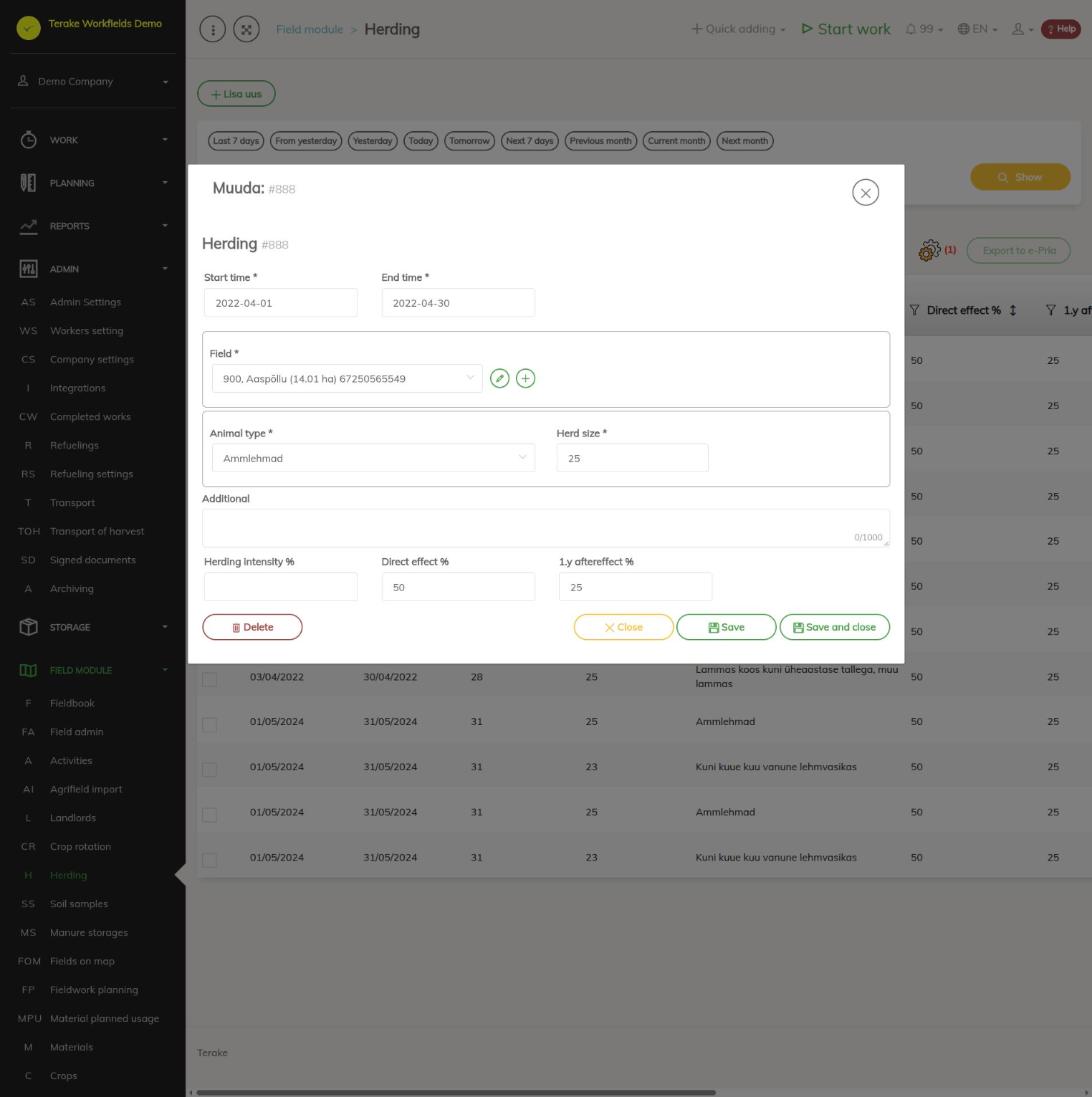
- Click the grazing row in the list. The “Edit” form opens.
- Change the dates, “Field”, “Animal type”, “Herd size” or “Additional”. A saved grazing record has one field and one animal type.
- When editing, the form also has the fields “Herding intensity %”, “Direct effect %” and “1.y aftereffect %” (see below).
- Press “Save” or “Save and close”. The “Delete” button deletes the grazing record.
How the nutrients are calculated
- Each animal type has a yearly manure amount per animal and the N and P content of the manure. The grazing’s manure amount is the yearly amount × “Herd size” × number of days / 365, multiplied by the “Herding intensity %” value (an empty intensity means 100%).
- The N and P amounts are calculated from the manure amount. “Direct effect %” is the share counted towards the nutrients of the grazing year, “1.y aftereffect %” the share counted towards the following year.
- You can see the results in the field’s fieldbook: the N and P amounts on the “Fertilizer NPK data” tab and the grazing summary (manure, N and P in total and per hectare) on the “Herding” tab.
How to send grazing records to e-PRIA
- Tick the grazing rows in the list.
- Press “Export to e-Pria”. The “Progress” window shows the number of rows sent (“Total”, “Success”, “Failed”).
- When sending has finished, close the window. Successful rows are unticked, and the “Pria sync time” column shows the sending time. If sending failed, the “Result” column shows the reason or the PRIA error message.
To send a grazing record to e-PRIA, the following must be true:
- On the grazing start date, the field must have a crop year with an “ARIB applicant” (ARIB is how the English interface names PRIA) who exists in e-PRIA (see ARIB applicants). Otherwise the result is “Saagiaastal puudub Pria taotleja” (the crop year has no PRIA applicant) or “Pria taotlejat … e-Prias ei ole” (PRIA applicant … does not exist in e-PRIA).
- The start and end of the grazing must fall within the range allowed for the crop year: from 1 July of the previous year to 9 February of the following year (for example, for crop year 2026 the range is 2025-07-01 … 2027-02-09).
- The grazing must have an animal type selected.
- The sender must have a personal identification code confirmed by Terake (“Kasutaja isikukood puudub või ei ole kinnitatud”: the user’s personal identification code is missing or not confirmed). To have it confirmed, write to support@terake.com.
e-PRIA receives the grazing period, the N and P amounts in total and per hectare, the grazing hours (days × 24, multiplied by the intensity), and the number and species of animals. A grazing record already sent may be sent again, for example after a correction.
Who can see and change it
The page is visible to “Administrator”, “Observer” and “Agronomist”. Grazing records are added and changed by “Administrator” and by workers whose role has the right to change grazing records; “Observer” sees the list read-only.
Tips
- You set the field’s crop year and PRIA applicant on the Crop rotation page.
- After saving, check the “Direct effect %” and “1.y aftereffect %” values: they affect the nutrient accounting in the fieldbook.
API calls on this page
For integrations and AI assistants: this page uses the following Terake API calls. The full description is in the API reference.
When the page opens:
GET /api/herdings– Herding collection
Adding, changing and deleting (from the API description):
DELETE /api/herdings/{id}– Delete Herding by ID or UUIDPOST /api/herdings– Create new HerdingPUT /api/herdings/{id}– Modify Herding
Other calls from this screen’s dialogs and actions:
GET /api/herdings/{id}– Herding by ID or UUIDPOST /api/pria-activities/herding/{herding_id}– Send Herding to e-PriaPOST /api/pria-activities/{workdone_id}– Send Activity to e-Pria