The detail view is the list of finished works. Here a manager, approver or project manager reviews the works of the selected period, corrects them and approves them. The list contains both approved and unapproved works. You can see works in progress on the Realtime info page.
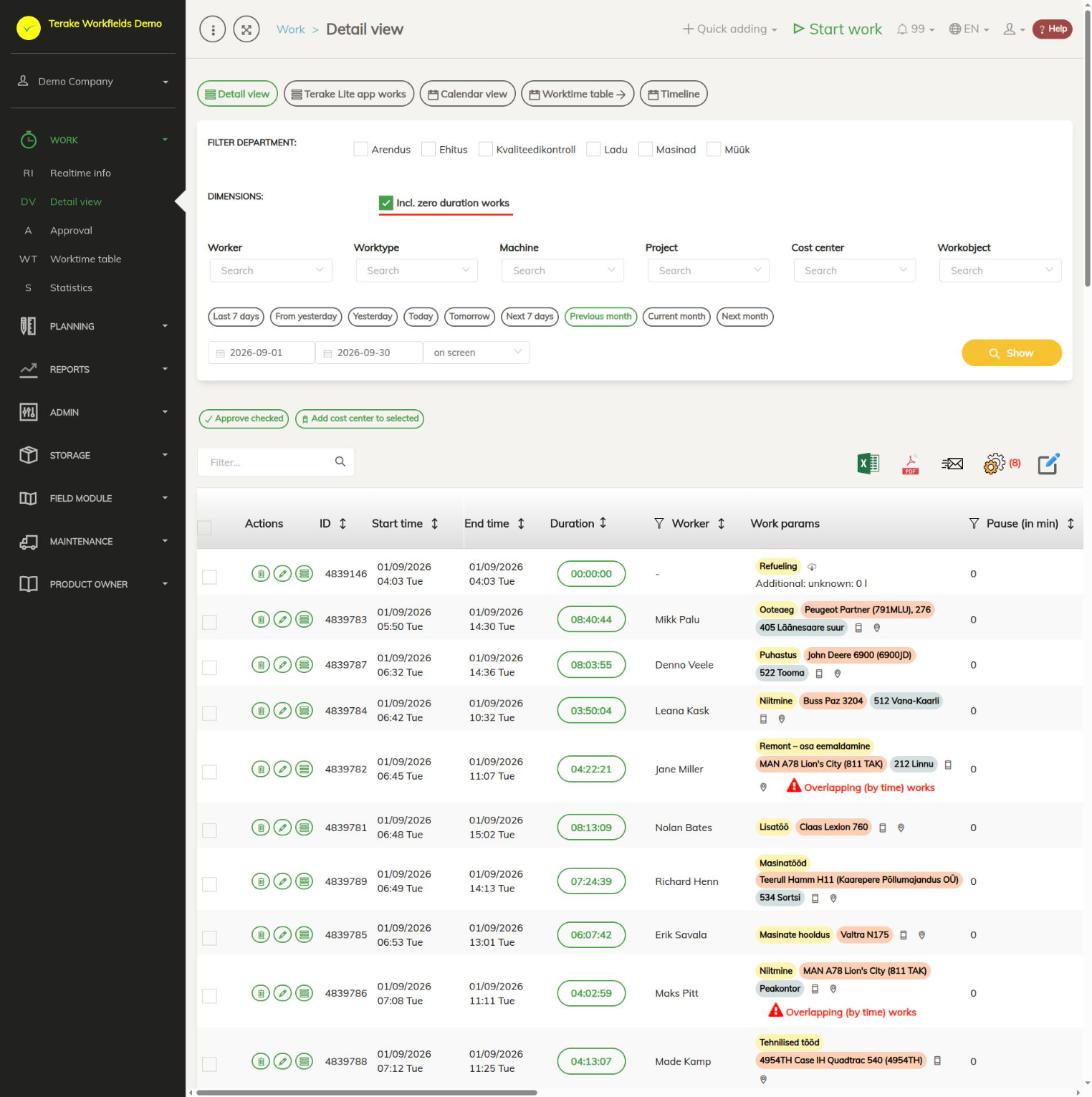
Page layout
At the top of the page are the view buttons:
- “Detail view” – the list of finished works. This view is open by default.
- “Terake Lite app works” – works registered with the Terake Lite app. The button is visible only if the company uses the app. These works can only be viewed.
- “Calendar view” – each worker’s hours day by day. Unapproved work time is red, approved work time green. If a worker had no work that day but was absent, the cell shows “Sick”, “Vac.” or “Not available”. On the right are the columns “Total”, “Days at work”, “Norm days” and “Norm hours”. Clicking the hours opens the list of works for that day.
- “Worktime table” – opens the Worktime table page.
- “Timeline” – the works of one day or the previous 7 days on a time axis. At the top you can choose how the rows are divided, for example by “Worker”, “Worktype”, “Machine”, “Place of work”, “Project” or “Customer”.
Below the views are the filters:
- “Filter department” – shows only the works of the selected departments.
- “Dimensions”: “Incl. zero duration works” – when selected, the list also includes works whose start and end are at the same moment.
- “Worker”, “Worktype”, “Machine”, “Project”, “Cost center” and “Workobject” – narrow the list down by one value.
- The period buttons (“Last 7 days”, “Yesterday”, “Today”, “Previous month”, “Current month” and others) or dates. The data of a new period is shown after you press “Show”.
Above the table are the buttons “Approve checked” and “Add cost center to selected”. They change all works ticked at the start of the row. On the right are buttons for opening the table in Excel or as a PDF file, sending the selected rows by e-mail, choosing the visible columns and changing the details of several selected works at once (“Bulk edit parameters”). The red number next to the settings icon shows the number of hidden columns.
The most important columns of the table:
- “Actions” – the buttons “Delete”, “Edit” and “View”.
- “Duration” – clicking the duration opens the work edit form. A warning triangle means the duration is unusual: less than 5 minutes or more than 12 hours. A red button means the duration is less than 1 minute or more than 24 hours.
- “Work params” – work name, machine, implement, place of work, customer, project and maintenance unit. Also icons: work started from the mobile app (red if the work was started or done farther away from the workobject), location on the map, files and pictures, related task or schedule. Additional info, material usage and foreman details are here too. The red mark “Overlapping (by time) works” opens a list of works of the same worker or machine that took place at the same time.
- “Approving” – an unapproved work has an “approve” button, an approved work shows a tick and the approver’s name.
- “Feedback” – the customer’s feedback on work that a partner has done for your company (see below).
How to change a work
- Select the period and, if needed, filters, and press “Show”.
- Click the duration on the work’s row or the “Edit” button. The “Work admin form” opens.
- On the “Main data” tab, correct the start, end, pause, worker, work name, machine, place of work or whatever else is needed.
- Press “Save” (the form stays open) or “Save and close”. “Save as copy” creates a new work with the changed details and keeps the original work.
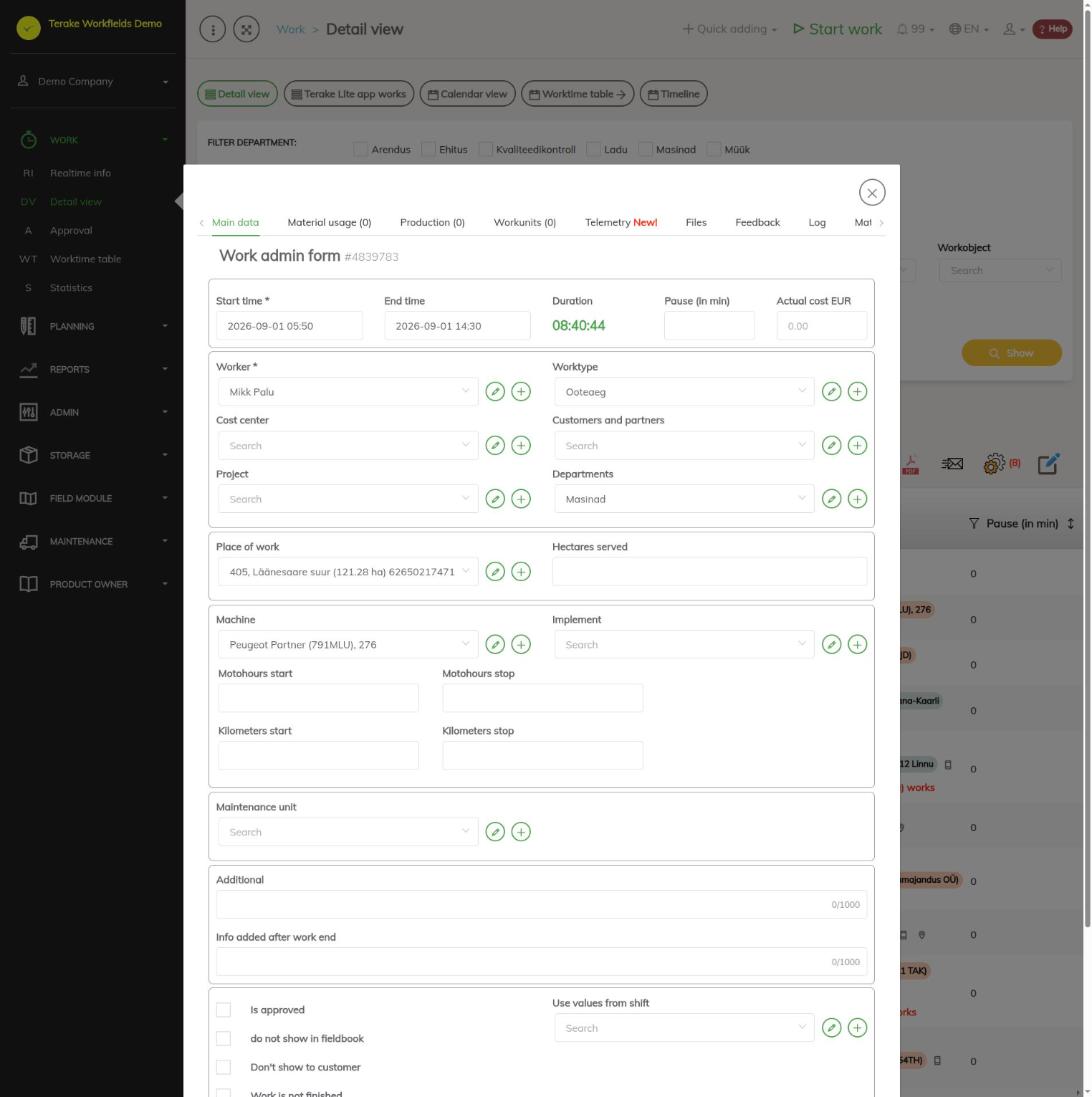
The other tabs of the form contain the work’s “Material usage”, “Production”, “Workunits”, “Telemetry” (if the work has a machine), “Files”, “Feedback” and “Log”, which shows who changed the work and when. If you do not have the right to change the work, the form opens for viewing only and has just the “Close” button.
How to approve a work
- Select the period and press “Show”.
- To approve one work, press “approve” in the “Approving” column on its row.
- To approve several works, tick the rows, press “Approve checked” and then “Save and close”.
- You can also approve in the form: tick “Is approved” and save. To cancel the approval, remove the tick there.
Only finished works can be approved. If a worker’s work time is counted by the schedule, the “Approving” column shows the text “by schedule” instead of the button. Such a work can be approved only after a schedule has been selected in the “Related schedule” field of the form.
There is a separate page for unapproved works: Approval.
How to change and add works on the timeline
- Press “Timeline” and select the day.
- Dragging the end of a work changes its start or end. The time is rounded to the nearest 15 minutes.
- Dragging a work to another row gives the work that row’s worker, machine or other value.
- To add a new work, select a time range on a row with the mouse. A form opens with the time and the row’s value already filled in. A work added from the timeline has “Is approved” ticked by default.
Works done by a partner and customer feedback
If a partner has done work for your company and shared it with you, those works are visible in the list, but you cannot change them. On such a row the “Feedback” column has a button of the same name. Press it, tick “Approved”, add a “Comment” if needed and press “Continue”. After that the column shows “Is approved” or “Not approved” and the details of the person who answered. Use the pencil button to change the feedback.
Who can see and change it
The menu item is visible to the roles “Administrator”, “Approver”, “Observer” and “Project Manager”.
- “Administrator” and “Observer” see all works of the company.
- Others see their own works, those of their subordinates and of the workers they approve, and the works of the projects they are project manager of. They see works from the first day of the month that started three months ago.
Works may be changed and approved:
- By the roles “Administrator” and “Power user”, always.
- By the role “Agronomist”, always for field works linked to a field’s growing season.
- By the role “Approver”, for the works of the workers marked as theirs to approve. This is done in the “Worker settings” menu: open the approver’s “Worker” form, the “Roles” tab, tick the workers needed in the “Approvable workers” block and press “Save approvable workers”.
- By a worker’s boss, for the works of their subordinates (the boss is set in the “Boss” field of the worker form).
- By a project manager, for the works of the projects they manage. The role “Project Manager” also for works without a project.
- A worker can change their own work as long as it is not approved.
- Works without a worker can be changed by any user who can see them.
When more than 30 days have passed since a work was approved, only the roles “Administrator” and “Power user”, and for field works also “Agronomist”, can change it.
The “Observer” role gives the right to view works, but not to change them in the form. Others are not allowed to change works. If your company has people who need to change works but are nobody’s boss, give them the “Approver” role and mark the workers they approve. Roles can be given by a user with the “Administrator” or “Personnel” role.
Tips
- If “Approve checked” or the multiset gives an error message, the selection includes a work you are not allowed to change. Select only the works you have the right to change.
- Refuelling works cannot be deleted here. Delete the refuelling in the “Admin” → “Refuelings” menu.
- The choice and order of columns are saved for your user. The detail view and the approval view keep them separately.
- The system sometimes finishes or shortens works by itself, for example when the phone is out of coverage. Read more: Automatic processes that affect work duration and Automated processes.
Video guides
Detail view, part 1
Detail view, part 2: calendars
API calls on this page
For integrations and AI assistants: this page uses the following Terake API calls. The full description is in the API reference.
When the page opens:
GET /api/is-workfields-app-in-use– Whether the company has any TTKI work recorded through the Workfields appGET /api/workdones– Workdones detailed list by period
Adding, changing and deleting (from the API description):
DELETE /api/workdones/{id}– Delete Workdone by ID or UUIDPOST /api/workdones/{id}/files– Add new file to parent objectPOST /api/workdones/{wdid}/materialusages– Creates new MaterialUsage for workdonePOST /api/workdones– Create new WorkdonePOST /api/workdones/{wdid}/recalcmaterialusages– Recalc material usage for workdonePUT /api/workdones/{id}– Modify Workdone
Other calls from this screen’s dialogs and actions:
DELETE /api/rosteritems/{id}– Delete Rosteritem by ID or UUIDGET /api/geometry/workobject/{id}– Geometry of one workobject.GET /api/location/device/workdone/{workdone_id}– Device location track recorded during one workdoneGET /api/location/facilities/history– Location history of a facility over a periodGET /api/workdonehours/{period}– Each worker's hours in the period by hour type: norm, overtime, night etcGET /api/workdones/{id}– Workdone by ID or UUIDGET /api/worktimereports/ttki-works– Finished works started by the TTKI solutionPOST /api/rosteritems/{id}– Creates or modifies a Rosteritem (Scheduled Work or an absence). Returns an array of itemsPOST /api/signed-document-pdf– Renders a signed document as a PDFPUT /api/workdone/approve/{id}– Approves the WorkdonePUT /api/terake-relations– Replaces the relations between one Terake object and a set of objects of another typePUT /api/workdone/approve_client– Lets a customer approve or reject a Workdone through the token link sent to them