On the “Fuels” page you manage the fuel names used when registering refuelings and in fuel accounting. A fuel is selected for every refueling. The page is used by the administrator. The list, loading from a file, archiving and “Bulk edit parameters” are described in general on the Admin Settings page.
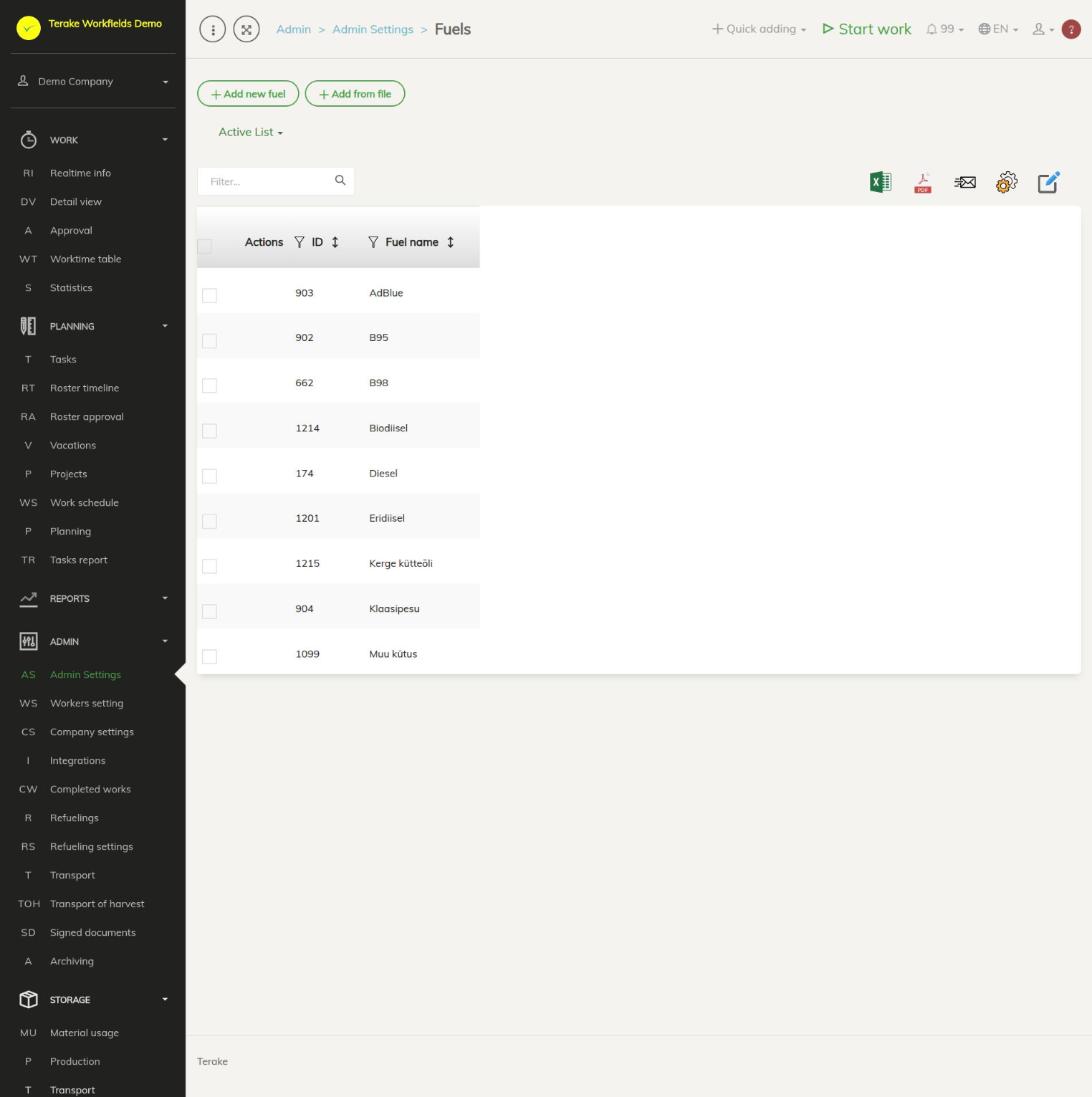
Page layout
- The “Add new fuel” and “Add from file” buttons and the “Active list” / “Archived list” drop-down. Active fuels can be selected when refueling, archived ones cannot.
- The table has the “Actions”, “ID” and “Fuel name” columns.
- The common Terake fuels (e.g. diesel, AdBlue) are also in the list. You cannot change them, but with the “Archive” button in the “Actions” column you can hide them from your options.
- With “Bulk edit parameters” you can archive (“Archived”) or delete (“Deleted”) the ticked fuels.
How to add or change a fuel
- Press “Add new fuel” or click the row of one of your company’s fuels. For an existing fuel, the “Edit fuel” window opens.
- Enter the “Fuel name” (mandatory). The form has no other fields.
- Press “Save” (the window stays open) or “Save and close”. The window also has the “Delete” and “Close” buttons.

How to archive a fuel
- Tick the fuels that are no longer used in the table.
- Press “Bulk edit parameters”, tick “Archived” and save.
- The fuel disappears from the refueling options but stays with earlier refuelings. To restore it, open the “Archived list” and clear the checkbox in the same way.
How to load fuels from a file
Press “Add from file” and follow the steps on the Admin Settings page. The only field in the file is “Fuel name”, and it is mandatory.
Who can see and change it
The page is in the Admin menu and opens only for the “Administrator” role, who can add, change and archive the company’s fuels. Common Terake fuels can only be archived for your own company. The “Accountant” and “Vehicle service” roles can add and change fuels with the pencil and plus buttons next to the “Fuel” selection field on the refueling form. If “Users have by default create privilege” is ticked in the company settings, other users, except “Observer” and “ARIB employee”, can also add a new fuel with the plus button and change a fuel they added within 48 hours of adding it.
Tips
- Before adding a new fuel, check whether a suitable fuel is already among the common Terake fuels.
- If the fuel has already been used for refuelings, archive it instead of deleting it.
- Read about registering refuelings on the Refuelings page, and about machines’ fuel balances and fuel consumption on the Refueling settings page.
API calls on this page
For integrations and AI assistants: this page uses the following Terake API calls. The full description is in the API reference.
When the page opens:
Adding, changing and deleting (from the API description):
Other calls from this screen’s dialogs and actions (from the web client’s code):