“Field admin” in the storage module is the same list of fields as in the field module, and it is shown to agricultural companies. In the storage module a field matters in two ways: the harvest is hauled from the field to a storage, and the field itself can be used as a storage (for example a silage store or clamps on the field).
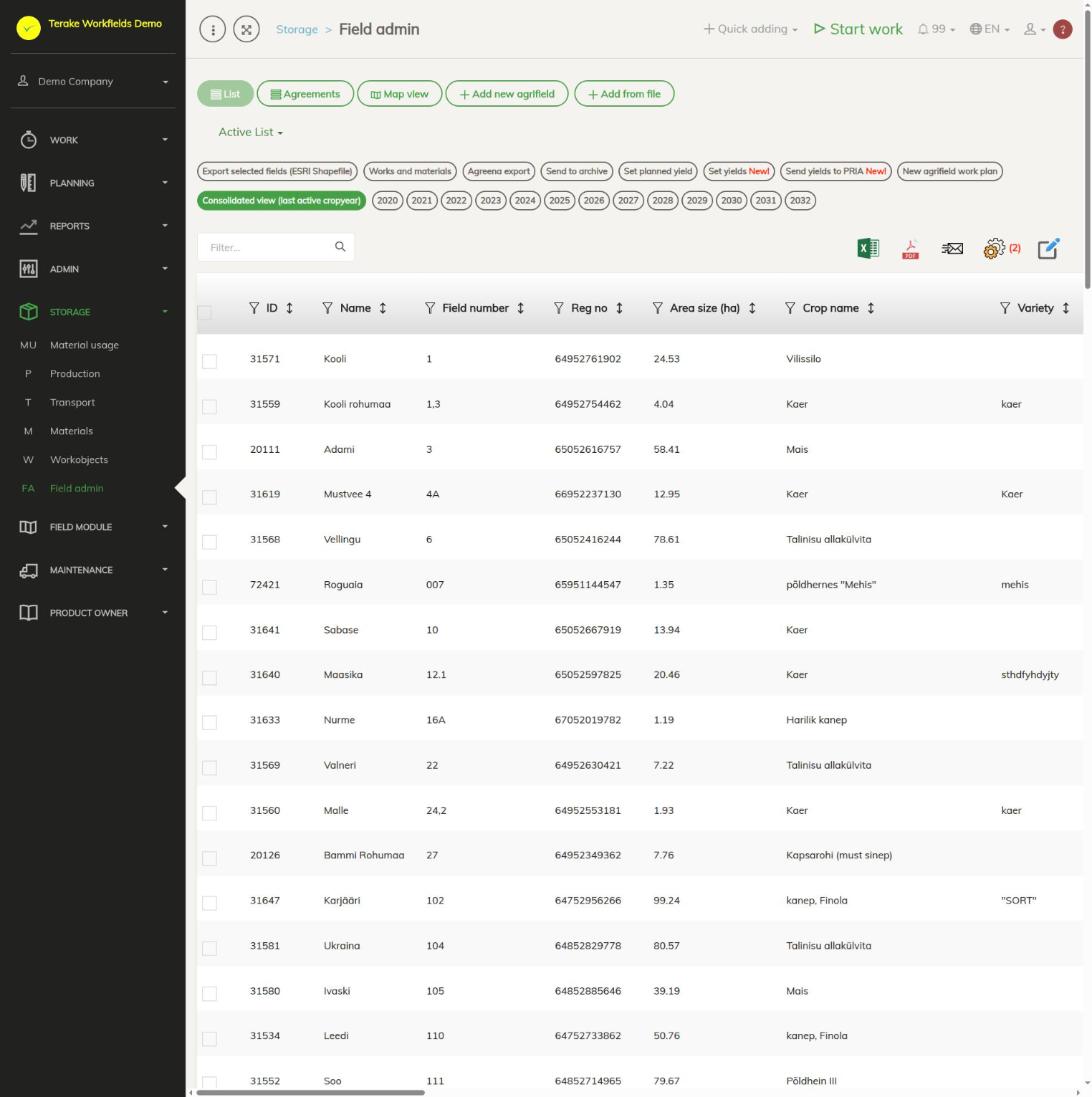
Page layout
- Views “List”, “Agreements” and “Map view”, buttons “Add new agrifield” and “Add from file”.
- Crop year buttons: “Consolidated view (last active cropyear)” or a specific crop year.
- The table includes “Name”, “Field number”, “Reg no”, “Area (ha)”, “Crop” and “Variety”. Click a row to open the field.
- The buttons for actions on several selected fields at once (export, “Works and materials”, yields and more) are described on the page Field admin.
How to use a field as a storage
- Click the field’s row.
- On the “Main data” tab, tick “Used as storage”.
- Press “Save”.
Such a field can then be selected in the “Storage” field on a work’s material row and when entering an inventory balance, and used as the origin or destination of a transport just like a storage. The field’s window then has an “Inventory” tab with the materials in it and their amounts.
Harvest from the field to a storage
When the origin of a transport is a field, the destination is a storage and the material hauled is of the silage type, the transport is saved as a harvest transport (see Transport of harvest). Terake sets the material hauled from the field’s crop year:
- if the crop year’s “Crop purpose” is “teraks või avamaal” (for grain or in open field) or “katmikalal” (under cover), the material is the harvest of that crop;
- otherwise the material is the destination’s silage of that year.
A missing harvest or silage material is created, and the destination of the transport is marked as a storage. The amount hauled is added to the destination’s inventory. That is why it pays to keep the crop and the “Crop purpose” correct in the field’s crop year; you change them on the field’s “Crop years” tab.
How to add or change a field
- Press “Add new agrifield” or click an existing field.
- On the “Main data” tab, fill in “Workobject name”, “Reg no”, “Field number” and other fields as needed. Press “Save”.
- Add the crop year, the crop and the field boundary on the “Crop years” tab.
All the fields and tabs of a field are described on the field module page Field admin.
Who can see and change it
The menu item is in the storage module for employees of an agricultural company who have the role “Stock management”. The roles “Administrator”, “Stock management” and “Agronomist” can add and change fields.
Tips
- Work objects used as storages are managed on the page Workobjects.
- The inventory and movements of the harvest are shown in the harvest material’s window on the page Materials.
API calls on this page
For integrations and AI assistants: this page uses the following Terake API calls. The full description is in the API reference.
When the page opens:
GET /api/agrifield_data/{crop_period_id}– Agrifield collection
Adding, changing and deleting (from the API description):
DELETE /api/agrifield_data/{crop_period_id}/{id}– Delete Workobject
Other calls from this screen’s dialogs and actions (from the web client’s code):
DELETE /api/agreements/{id}– Delete Agreement by ID or UUIDDELETE /api/agreements/{agreement_id}/agreement_object/{agreement_object_uuid}– Removes an agreement objectDELETE /api/agrifields/{id}– Delete WorkobjectDELETE /api/inspections/workobject/{id}– Delete InspectionCase by ID or UUIDDELETE /api/workobjects/cadastres/{workobject_id}/{cadastre_id}– Removes a Workobject from a CadastreDELETE /api/workobjects/{id}– Delete WorkobjectDELETE /api/workobjects/{id}/files/{uuid}– Delete fileGET /api/agreements/agrifield– Agreements collectionGET /api/agreements/{id}– Agreement by ID or UUIDGET /api/agrifield_data/{crop_period_id}/{random}– Agrifield collectionGET /api/agrifield_data– Agrifield collectionGET /api/agrifield/pria/massive/{massiveid}– Returns Pria MassiveGET /api/agrifields/{id}– Get WorkobjectGET /api/agrifields– Agrifield collectionGET /api/agrifield-multiworks– Work of several Agrifields around a dateGET /api/cadastres/{id}– Get CadastreGET /api/faults/workobject/{faultitem_consumer_id}– Faultitem collection of one work objectGET /api/faults/workobject– Faultitem collection of work objectsGET /api/fieldbook– Fieldbook Agrifield collectionGET /api/fieldsshapefile– Fields as a shapefileGET /api/geoinfo/cadaster/{num}– Cadastral register information for one cadastre numberGET /api/geometry/agrifielddata/{id}– Geometry of one agrifield_data record.GET /api/inspections– InspectionCase collectionGET /api/inspections/workobject/{consumer_id}– InspectionCase collection of one work objectGET /api/inspections/workobject– InspectionCase collectionGET /api/fieldbook/overlapping-check/{agrifield_id}/{crop_period_id}– Reports fieldbook entries whose geometry overlaps for one Agrifield and crop periodGET /api/workobjects– All Workobjects listPOST /api/agreements– Create new AgreementPOST /api/agrifieldplannedyield/{crop_period_id}– Sets the planned yield on the listed Agrifields for the crop periodPOST /api/agrifield-multiworks– Creates work for several Agrifields at oncePOST /api/agrifields– Creates or modifies a WorkobjectPOST /api/agrifieldyield/{crop_period_id}– Saves the harvested yield on the listed Agrifields for the crop periodPOST /api/pria-send-yields/{crop_period_id}– Sends the yields of the crop period to e-PRIAPOST /api/workobjects/cadastres/{workobject_id}/{cadastre_id}– Add Cadastre to WorkobjectPOST /api/workobjects– Creates or modifies a WorkobjectPUT /api/agreements/{id}– Modify AgreementPUT /api/agreements/{id}/togglearchive– Toggle Archive/Un-archive AgreementPUT /api/agrifields/{id}– Modifies a WorkobjectPUT /api/agrifields/{id}/setcropperiod– Sets the Agrifield data for a crop periodPUT /api/agrifieldworks/{id}/agrifieldsoperation/{action}– Add, exclude or clear one field in a planned job's selectionPUT /api/agrifieldworks/{id}/joinagrifield/{agrifieldid}– Add one field to a planned jobPUT /api/agrifieldworks/set/{id}/agrifields– Add fields to, or exclude them from, a planned jobPUT /api/crops/merge/{mergerId}– Merge cropsPUT /api/geometry/agrifielddata/{id}– Stores the geometry of an Agrifield data recordPUT /api/workobjects/{id}– Modifies a Workobject