“Materials” in the Field module is the same register of materials as under Admin, but here it is viewed by the agronomist: fertilizers, liming materials, seeds and plant protection products used in field work. Here you set up a material so that the fieldbook calculates fertilizer nutrients correctly and works can be sent to e-PRIA, the online service of PRIA (the Estonian Agricultural Registers and Information Board).
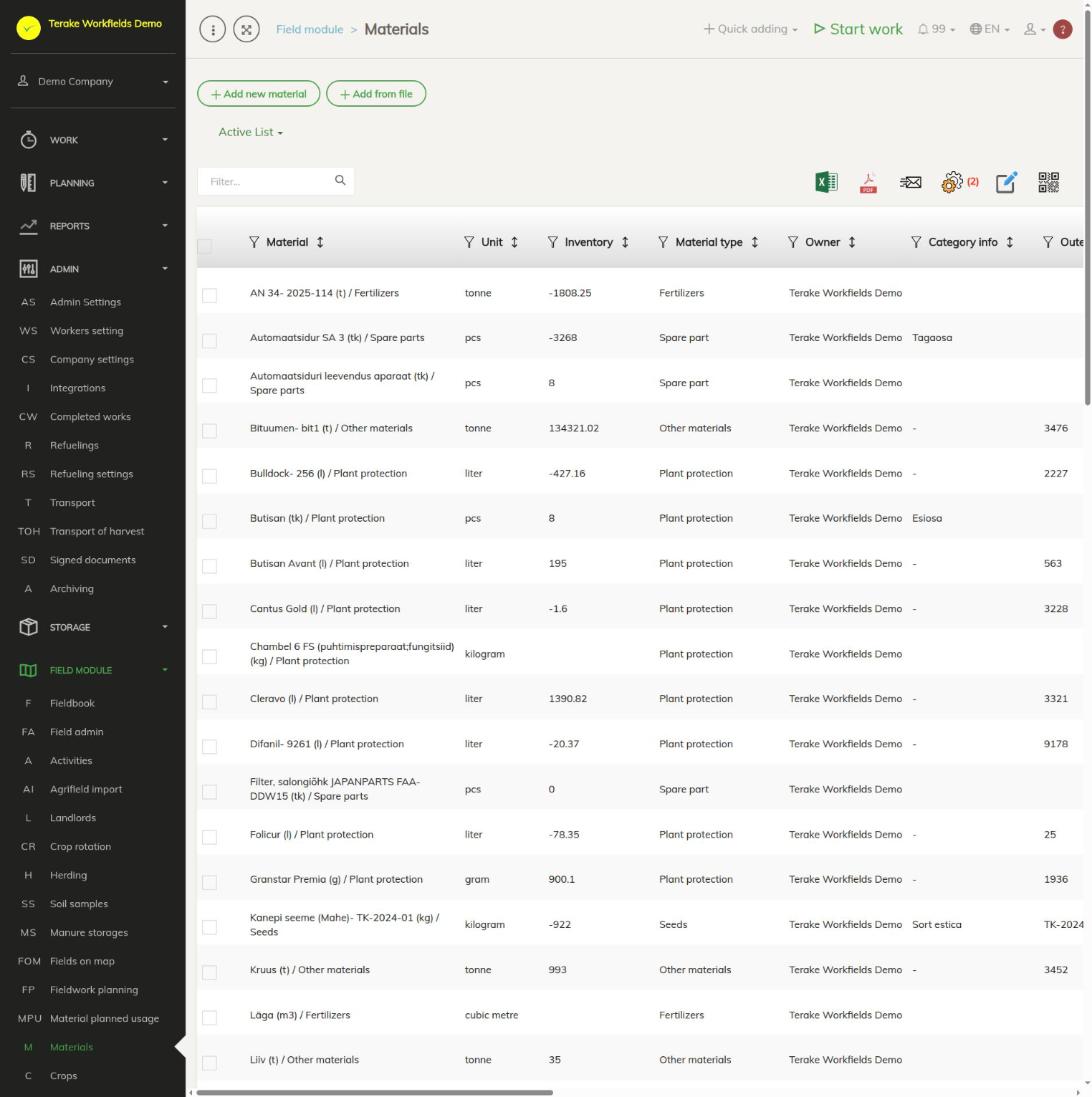
Page layout
- The “Add new material” and “Add from file” buttons and the “Active list” / “Archived list” choice.
- The table includes “Material”, “Unit”, “Inventory”, “Material type”, “Category info” and “Outer ID / ID 2”. Farms also have the columns “N coef (%)”, “P coef.”, “K coef.”, “S coef.” and “Is coated seed”, so you can review the nutrient content of fertilizers without opening the material.
- Click a material to open it. Above the table are icons for Excel and PDF export, the view settings, changing several rows at once, and QR codes.
How to add a fertilizer
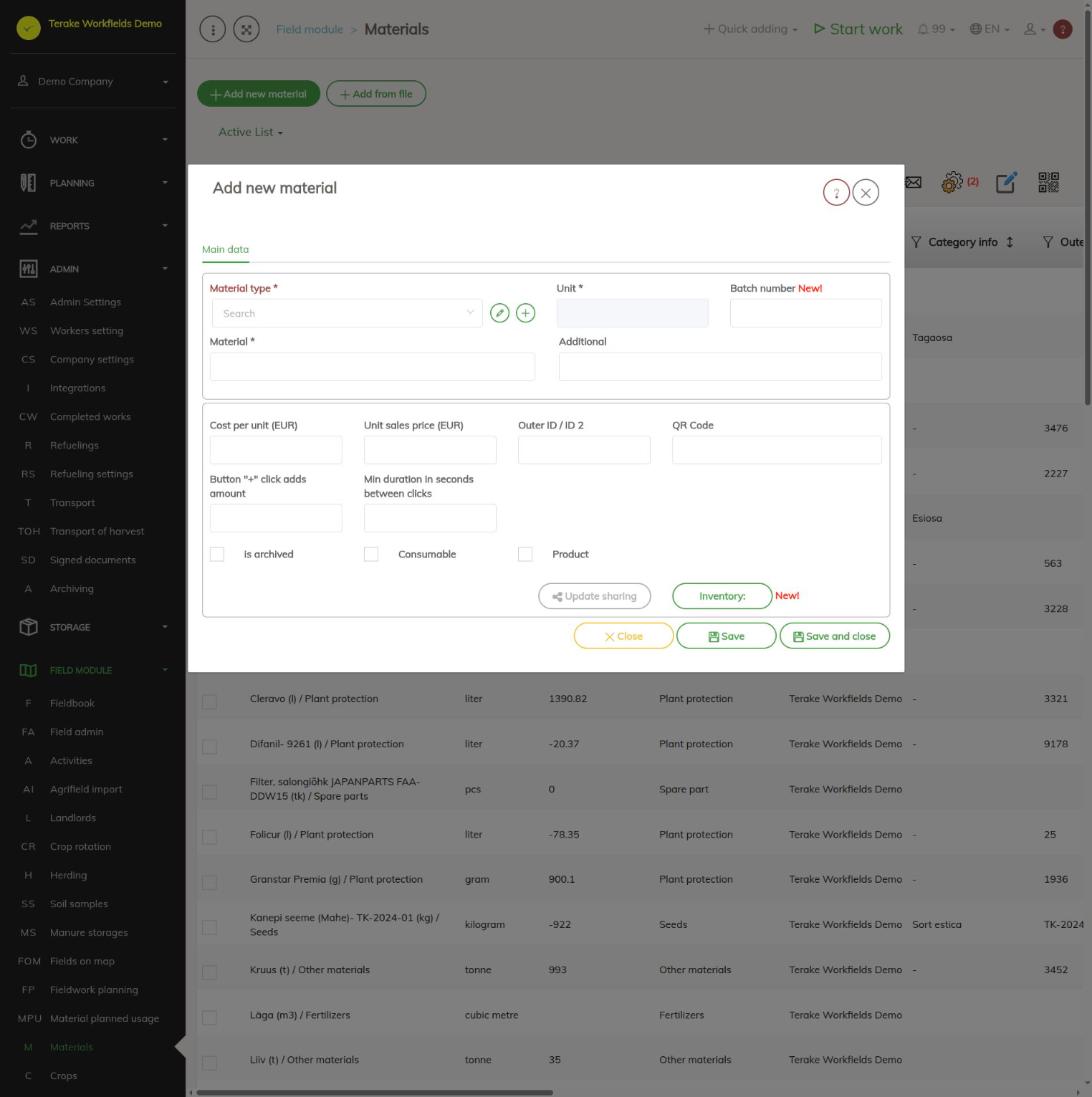
- Press “Add new material” and select “Fertilizers” as the “Material type”.
- Select the “Unit”; only units suitable for fertilizers are offered.
- Select the “Fertilizing material”. If the fertilizer is from the register, select it in the “Fertilizer registry” field; for an EU fertilising product, select the “Material code”. These fields are required. When you select from the register, the empty fields “Material”, “N coef (%)”, “P coef.” and “K coef.” are filled with the register data.
- Enter “Material” (the name) and, if needed, “Additional” and “Batch number”.
- Fill in the “Fertilizer NPK data” block: “N coef (%)”, “P coef.”, “K coef.” and “S coef.” are the share of the nutrient in the material as a percentage. If not all of a nutrient is taken up in the same year, open “» Näita järelmõjude vormi” (show the after-effects form) and enter “Direct effect”, “1.y aftereffect” and “2.y aftereffect” for each nutrient.
- Press “Save and close”.
A liming material likewise has a “Liming material type”, a “Fertilizer registry” field for a material chosen from the register, and the “Fertilizer NPK data” block.
How to add seed
- Press “Add new material” and select “Seeds” as the “Material type”.
- Select the “Unit” and the required “ARIB crop” and “Certificate”.
- Enter the variety name in the “Variety” field.
- If needed, tick “Is undersowing seed” or “Is cover crop seed”. For treated seed, tick “Is coated seed”, select the “Seed dressing agent” and enter the “Consumption rate per material unit”.
- Press “Save and close”.
How to add a plant protection product
- Press “Add new material” and select “Plant protection” as the “Material type”.
- Select the “Unit” and the “Plant protection material type”. If the product is from the register, select it in the “Plant protection material registry” field.
- If the product is used for treating seed, tick “Is coating material”; you can then select it in the “Seed dressing agent” field of the seed form.
- Enter “Material” and press “Save and close”.
What is needed for sending to e-PRIA
Works are sent to e-PRIA together with their materials. When sending, the materials are checked, and if there is a problem, a message is shown:
- A plant protection product must have a “Plant protection material type” and the unit g, kg, ml or l. For a type chosen from the register, a match must be selected in the “Plant protection material registry” field.
- Seed must have a “ARIB crop” and a “Certificate” selected and the unit kg, tonne or pcs.
- The fertilizer quantity is sent in kilograms (a quantity entered in tonnes is converted). The N, P and K amounts are calculated from the fertilizer’s coefficients and direct effect, so fill in the “Fertilizer NPK data” before sending.
- The unit of the harvest production (yield) must be tonne.
Who can see and change it
The Field module materials page is visible to “Administrator” and “Agronomist”. You can only change your own company’s materials. Another company’s materials (for example Terake’s shared materials) can be used and archived from your choices, but not changed.
Tips
- Enter a fertilizer’s NPK and after-effect data before the fertilizer is used in works. A later change does not recalculate the nutrient amounts of works already done.
- When loading from a file, “Material”, “Material type” and “Unit” are required; the file may also include fertilizer coefficients and direct and after-effects.
- A description of all fields (prices, QR code, lifespan of wear parts, inventory) and an example of calculating the coefficients is on the Materials page (Admin).
- You can see the material quantities planned for fields on the Planned material usage page, and inventory and movements on the Storage: Materials page.
API calls on this page
For integrations and AI assistants: this page uses the following Terake API calls. The full description is in the API reference.
When the page opens:
GET /api/materials– Material collection
Adding, changing and deleting (from the API description):
DELETE /api/materials/{id}– Delete MaterialPOST /api/materials/{material_id}/inventory– Save MaterialInventoryPOST /api/materials– Create or modify MaterialPOST /api/materials/{parent_id}/lifespan– Assign Lifespan to MaterialPUT /api/materials/{id}– Modify Material
Other calls from this screen’s dialogs and actions (from the web client’s code):
DELETE /api/workdones/{wdid}/materialusages/{usageid}– Deletes a material usage of a WorkdoneGET /api/materials/{id}– Get MaterialGET /api/materials/{id}/harvest_sources– Harvest Material sourcesGET /api/materials/{id}/material_composition– Harvest Material compositionGET /api/materials/{material_id}/inventory– MaterialInventory of a materialGET /api/workdones/{wdid}/materialusages– Workdone collection